Introduction
When I first learned about cloud computing, I understood that people could store information and use online services through the internet. However, I did not really understand what happens behind these services. To explore this topic, I chose the YouTube video Microsoft reveals its MASSIVE data center (Full Tour). This video provides a closer look at a Microsoft data center and shows the physical technology that supports cloud services. I wanted to understand how this video could help beginners learn about cloud computing.
Multimedia Resource: Microsoft reveals its MASSIVE data center (Full Tour)
Description of the Multimedia Resource
The video takes viewers inside a large Microsoft data center and introduces the equipment and systems needed to keep online services running. It shows server areas, security measures, and systems that support the facility’s operation.
I think this is an interesting educational resource because many people use cloud services without knowing what the infrastructure looks like. Instead of only reading about servers and data centers, learners can see a real example. This makes cloud computing feel less abstract and easier to imagine.
The video also helps explain that cloud computing involves more than storing files. It requires reliable equipment, physical security, and systems that can operate continuously.
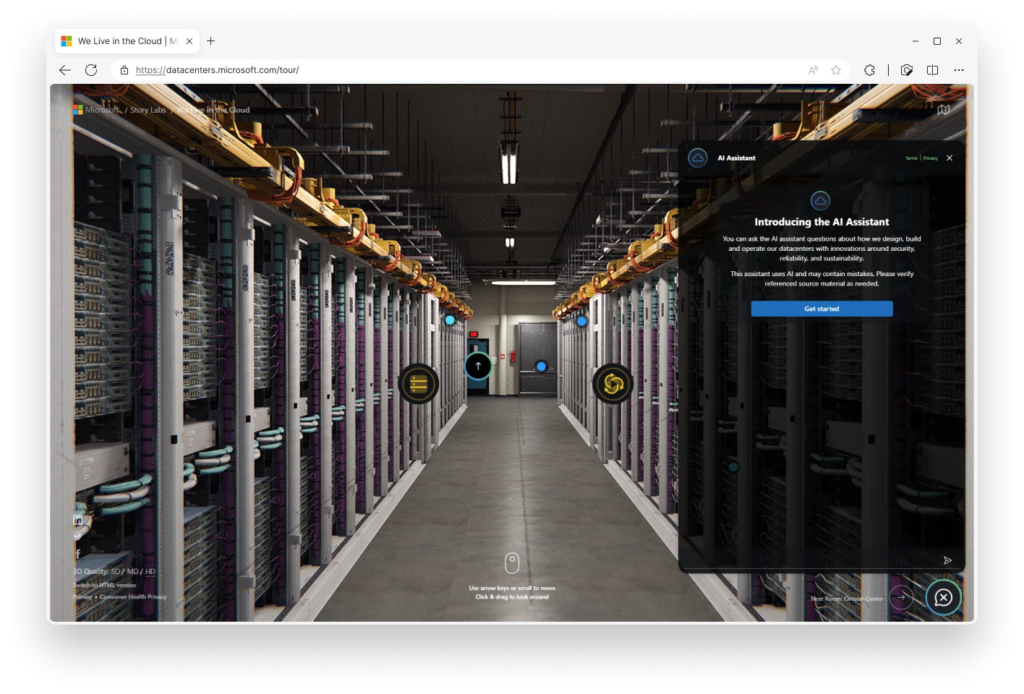
Figure 1. Server racks inside a Microsoft data center, illustrating the physical infrastructure that supports cloud computing. Source: Microsoft Microsoft’s Virtual Datacenter Tour opens a door to the cloud | Microsoft Azure Blog.
Connection to Mayer’s Multimedia Learning Principles
The first principle I noticed is the Multimedia Principle. According to Mayer (2009), people generally learn better from words and pictures together than from words alone. The video combines spoken explanations with real footage of the data center. This helps learners connect technical information with physical equipment.
Another relevant principle is the Temporal Contiguity Principle. Mayer (2009) explains that learning can improve when related words and visuals are presented at the same time. When the video shows equipment while explaining its purpose, viewers can connect what they hear with what they see.
However, I think the video could be improved through the Signaling Principle. This principle suggests that learners benefit when important information is clearly highlighted (Mayer, 2009). Some technical equipment may be unfamiliar to beginners. Adding simple labels or arrows could help viewers identify important components and understand their functions.
My Learning Experience
Before watching this video, I knew that cloud computing allowed people to store information and access online services, but I did not really understand how much physical infrastructure was needed. What surprised me most was the size of Microsoft’s data center. Seeing the large buildings and rows of servers helped me realize that cloud computing depends on real equipment rather than just the internet.
Another part I found interesting was the security system. The video shows how carefully access to the data center is controlled. This helped me understand why physical security is important for protecting the information stored in cloud services. I also learned about the backup batteries and generators that help keep the servers running when there is a power problem. I had never thought about how important electricity was for keeping online services available.
However, I found some of the technical information difficult to understand because the video moves through different topics quite quickly. I think adding simple labels or diagrams would help beginners understand how the equipment works.
Overall, this video helped me connect what I learned about cloud computing to a real-world example. It also made me realize that cloud services depend on many different systems working together, including servers, security, and electricity.
Overall Evaluation
Overall, I think this video is a useful educational resource for students who are beginning to learn about cloud computing. Its biggest strength is showing a real data center and helping learners connect technical concepts to physical infrastructure.
The video supports Mayer’s Multimedia Principle by combining visual information with spoken explanations. However, clearer labels and visual guidance could improve the learning experience.
I would recommend using this video after a basic introduction to cloud computing. If I were using it in a classroom, I would ask students to identify three important systems in the data center and explain how each one supports cloud services. This would help students focus on learning rather than only watching the tour.
References
References
CNET Highlights. (2021, January 13). Microsoft reveals its MASSIVE data center (Full Tour) [Video]. YouTube. https://www.youtube.com/watch?v=80aK2_iwMOs
Mayer, R. E. (2009). Multimedia learning (2nd ed.). Cambridge University Press. https://doi.org/10.1017/CBO9780511811678
Microsoft. (n.d.). Understanding Microsoft datacenters. Microsoft’s Virtual Datacenter Tour opens a door to the cloud | Microsoft Azure Blog